Understand your transport stream. Down to the byte.
Inspect MPEG-TS and M2TS recordings, investigate timing and signaling, and trace analysis findings to the packets behind them, all in one desktop workspace.
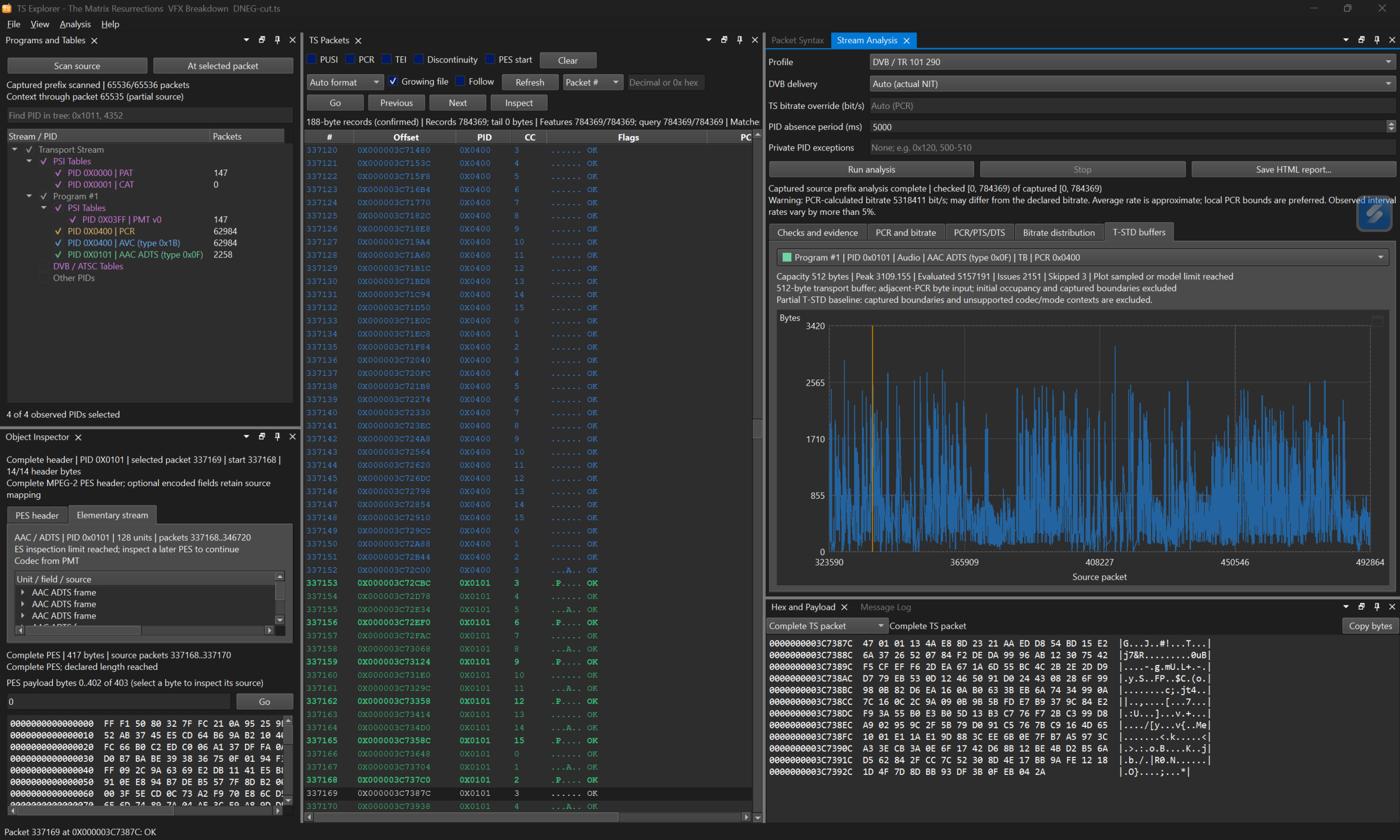
Product overview
See the structure. Follow the evidence.
A transport-stream issue can begin with a missing table, a continuity break or an unexpected timestamp. nablet TS Explorer brings those details into a connected view of your recording.
Move from programs and services to individual packets, assembled PES headers and elementary-stream syntax. Compare clocks and bandwidth in interactive graphs. When an analysis result needs a closer look, follow its evidence to the original bytes, even when those packets are outside your current filter.
Inspect packets with context
Browse TS and M2TS recordings, filter by PID and transport features, and inspect headers, adaptation fields and payloads. Linked syntax and hex views show where each decoded packet field is stored.
Explore programs and signaling
Understand how a multiplex is organized. Inspect MPEG program tables, DVB service information and ATSC PSIP, with supported descriptors, service names, event details and source-linked fields.
Look inside video and audio streams
Examine supported MPEG-2 Video, AVC/H.264, HEVC/H.265, MPEG Audio, AAC and AC-3/E-AC-3 syntax. Inspect parameter sets, configuration, header fields and metadata alongside their original source locations.
Investigate clocks and bandwidth
Compare PCR, PTS and DTS for a selected program. Explore timestamp steps, PCR-relative differences and per-PID transport bandwidth. Zoom into a region, expand the graph to full screen and navigate back to its source.
Examine SCTE-35 cues
Inspect splice commands, segmentation descriptors, identifiers, break durations and adjusted PTS. Follow supported cue fields to the exact bytes that carry them.
Turn analysis into evidence
Run file-based TR 101 290 assessments and investigate supported buffer models. Review findings with their timing basis and coverage, then export a standalone HTML analysis report for review and handover.
Analysis detail
Understand the result, and its scope.
TS Explorer presents 27 assessment rows across TR 101 290 Priority 1, 2 and 3 indicators. Applicable checks cover transport integrity, program signaling, PCR and PTS conditions, DVB service information and supported buffer behavior.
Workflow
From recording to a documented finding
Use cases
Where TS Explorer helps
Broadcast troubleshooting
Investigate missing services, continuity issues, table repetition and timestamp behavior in captured multiplexes.
Encoder and multiplexer QA
Examine recorded outputs for program structure, packetization, supported codec signaling and timing behavior.
Media software development
Inspect the transport packets, PES headers and elementary-stream configuration involved in a compatibility issue.
SCTE-35 investigation
Review captured splice messages and segmentation metadata when diagnosing ad-insertion or content-marking workflows.
Workspace
Arrange the tools around your investigation.
Dock, tab, float or auto-hide panels to keep the views you need close together. Save layouts for recurring tasks, retain table-column widths and expand investigation graphs to full screen when you need more room.
FAQ
Questions about TS Explorer
Which files can I inspect?
TS Explorer supports 188-byte MPEG transport-stream files and 192-byte M2TS files. It can inspect fixed recordings and growing files.
Does it support DVB and ATSC?
Yes. The inspector covers supported DVB SI and ATSC PSIP tables and descriptors. Validation scope depends on the selected profile; the ATSC validation profile currently covers synchronization, continuity and transport-error checks.
Can it receive streams or play video?
The current application works with files, including growing recordings. Direct UDP, RTP or SRT ingestion is planned for later releases. It focuses on analysis and syntax inspection, so audio/video playback and decoding are outside its scope.
What does TR 101 290 analysis cover?
File-based assessments across Priority 1, 2 and 3 indicators. Applicability and completeness depend on the profile, captured evidence, timing basis and supported codec or buffer model. Coverage is shown in the application and in reports; results are not a blanket conformance certification.
Can I share the results?
Yes. Export a standalone HTML analysis report with source information, settings, inspected range, coverage and retained evidence. Reports can also describe stopped or in-progress analysis, with their partial state identified.
Which platform is supported?
TS Explorer is a desktop application for Windows (64-bit, installer requires Windows 10 version 1809 or later) and macOS.
Get nablet news by email.
New product versions and news from nablet, sent to your inbox.
Get a clearer view of your transport streams.
Bring packet inspection, signaling, timing and file-based validation into one investigation workflow.